
Number Ranges
Download as PDFOverview
Use the Number Ranges feature to automatically assign numbers to newly created documents and Master Data records. You can define different number ranges for different types of data. For example, your Invoices can have a different numbering convention than your Sales Reports.
By default, suggestions for number ranges are already included in your system, but they can be customized as desired.
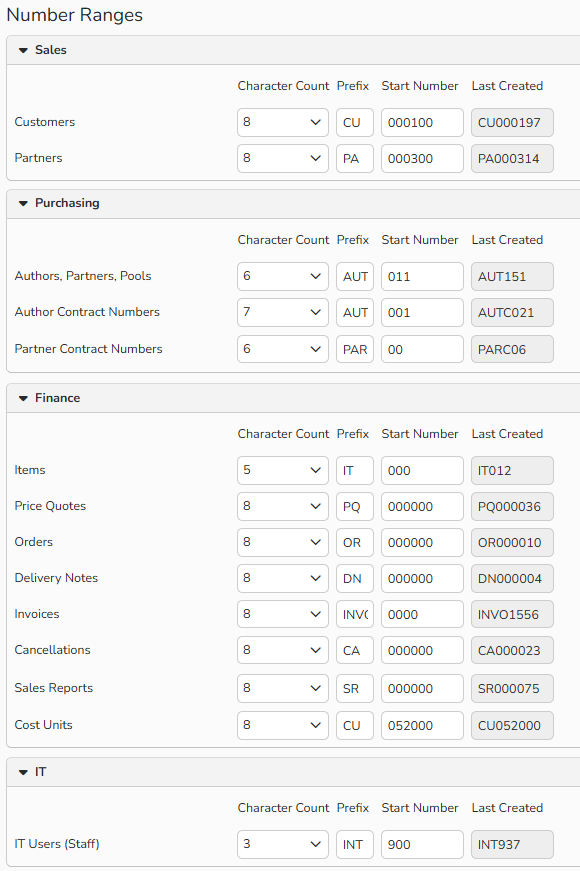
Administration > Company Settings > Number Ranges: define numbers in Sales, Purchasing, Finance, and IT Users areas
Available number ranges
When you create a new record or document in Backstage, the system automatically uses the assigned number range to generate its number.
You can define custom number ranges for the following types of data and documents:
Sales
| Customers | Number of your Customers |
| Partners | Number of your Sales Partners (other agencies or companies that sell your media) |
Purchasing
| Authors, Partners, Pools | Numbers of your Authors (individual media creators); Purchasing Partners (other agencies or companies whose media you sell); Author Pools and Syndicates |
| Author Contract Numbers | Numbers for your Author Contracts |
| Partner Contract Numbers | Numbers for your Partner Contracts |
| Pool Contract Numbers | Numbers for your Author Pool and Syndicate Contracts |
Finance
| Items | Numbers for your saleable items and services |
| Item Groups | Number for groups of associated items |
| Price Quotes | Numbers for price estimates of your saleable Items |
| Orders | Numbers for documents that confirm orders |
| Delivery Notes | Numbers for documents that accompany deliveries |
| Invoices | Numbers for bills to media buyers |
| Credit Memos | Numbers for documents to media buyers that show you have reduced their balances |
| Cancellations | Numbers for documents to media buyers that show sales that have been cancelled |
| Sales Reports | Numbers for documents to media suppliers with details of their sales and royalties |
| Sales Reports Credit Memos | Numbers for credit memos to media suppliers |
| Sales Reports Cancellations | Numbers for documents to media suppliers with sales adjustments |
| Debtors | Numbers for Debtor Accounts |
| Vendors | Numbers for Vendor Accounts |
| Cost Canters | Numbers for Cost Canters |
| Cost Units | Numbers for Cost Units |
IT
| IT Users | Numbers for your staff members |
Number range formats
Configure number ranges with the following values:
- Character Count: The value represents the total number of characters (letters and numbers) in each entry.
- Prefix: For each range, the prefix sets the letters or numbers that come before the main number.
- Start Number: The value from which numbering begins.
- Last Created: Displays the last number created in your system for that range.
Define number ranges
You can easily modify a number range:
- Go to Administration > Company Settings > Number Ranges.
- Define Character Count, Prefix and Start Number
- In the area for which you want to modify the number range (Sales, Purchasing Finance or IT) locate the Number Range you want to modify.
- Configure Character Count, Prefix and Start Number.
- Click Save.
- The updated number range applies to all future records you create.
Tip
When importing data, for example such as your authors, their numbers can also be transferred. If this is intended, simply enter the sequential number according to the scheme of the existing numbers and adjust the counter reading accordingly.
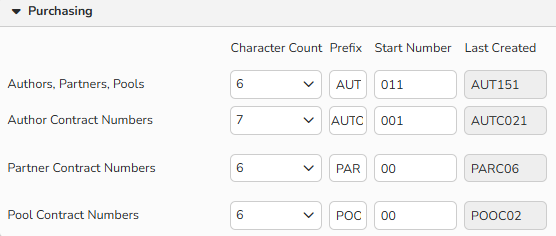
Number Range defined for the Purchasing area
Note
You can also manually change the numbers within the master data records in the Sales, Purchasing, Finance, and Administration (Users) modules of Backstage.