
Action Run Groups
Download as PDFOverview
Use action run groups to organize action runs within folders, for example to combine them for events, topic areas, or team members.
Create Action Run Groups
To create action run groups, proceed as follows:
- Navigate to Media Management > Action Runs > Action Run Groups and select Edit > New.
- In the Action Run Group setup window, fill in the Name field. Use a descriptive name to easily identify the Action Run in other areas of the system.
- Enable the Active option to activate the action run group.
- Optional: In the Languages panel, specify the name that will appear in the selection menu for each system language.
- Select the folders for the Action Run Group and click Add. To clear selection, click Remove.
- Select individual Action Runs to include in the Action Run Group.
- Click Save.
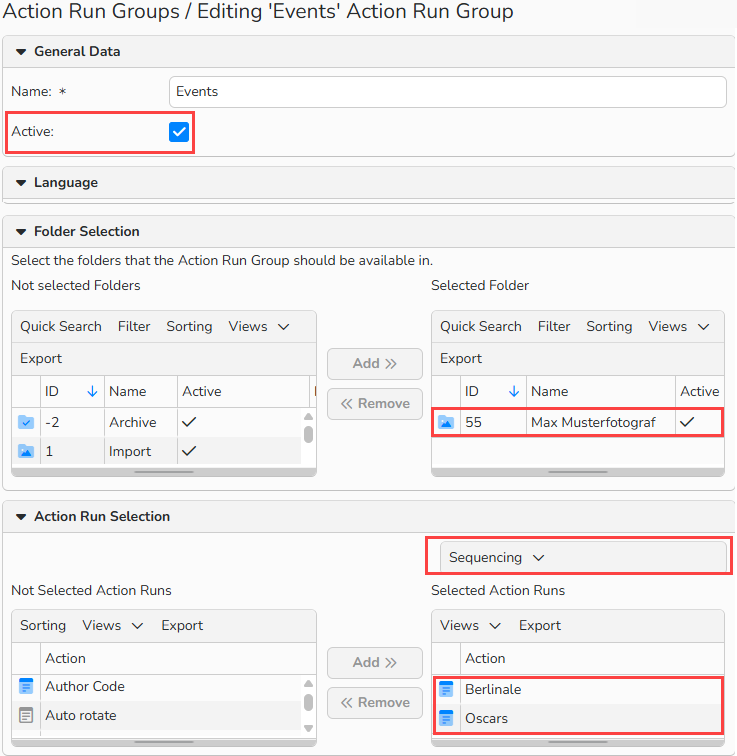
Action Run Groups configuration
Tip
Define the Order of Action Runs
In the Sequencing menu above the selected action runs, set their order to define how they appear within folders.
Manage Action Run Groups
In Media Management > Action Runs > Action Run Groups you can find a list of all existing action run groups.
To create a new action run group
- Select Edit > New.
To edit an action run group
- Double-click the name or select the record and choose Edit > Open.
- Make the changes.
- To deactivate an action run group, disable the Active option.
- Click Save.
Batch Processing of action run groups
- Select action run groups in the overview.
- To select a continuous data range: SHIFT + Click.
- To select a non-continuous data range: CTRL (PC) or CMD (Mac) + Click.
- Choose Edit > Batch Process from the menu.
- Make changes and click Save.
To copy an action run group
- Select the desired record and choose Edit > Copy.
To delete an action run group
- Select the desired record and choose Edit > Delete.
Note
The integrated table functions allow you to search, filter, and sort records. For more information on these functions, as well as how to set up custom views and use the export function, see the Advanced Table View FAQ.
You can learn more in the Understanding Action, Action Run, or Action Run Group FAQ.