
Multilingual Index
Download as PDFOverview
Backstage supports multilingual content for images, videos, and other media by default. To add keywords in multiple languages, you can use extended language indexes. With the Multilingual Index feature, you ensure precise, flexible searchability of your Archive across several languages.
Before you start
By default, each system's search index is in a single language. The optional Multilingual Index is a one-time add-on service not covered by your service contract. Its scope depends on the size of your media archive and existing keyword structure. We’ll gladly advise you and provide a customized quote.
Please note: Using two or more indexes slightly increases your monthly metadata volume, which may raise ongoing costs.
Important: Maintenance for Multilingual Keywords
Plan for extra effort when managing multilingual metadata. Maintenance isn’t automated, and separating existing mixed-language keywords is only possible if foreign-language terms were properly marked or separated.
Tip
Tag Media in Multiple Languages Early
For integrating additional language indexes (called Multilingual Index in picturemaxx), it’s best to tag your media in one or more languages from the start. Adding extra language masks later is effortless. You can also use the setup of the Multilingual Index as an opportunity to translate your media into multiple languages.
Multilingual support in Backstage
Your Backstage media database lets you enter embedded metadata into different masks to handle language-specific searches. The IPTC standard does not separate metadata by language, meaning there is only one field for keywords regardless of language. Backstage default configuration follows this standard.
How the standard search works
To help foreign-language editors find your media, Backstage uses dictionaries.
picturemaxx provides pre-filled dictionaries, such as English (GBR) ↔ German, and supports adding custom dictionaries in up to 75 languages.
You can find dictionaries in Backstage under:
Media Management > Classifications > Dictionaries
Note
For details on managing dictionaries, see the Dictionaries FAQ.
Example: Search and Translation in Standard Search
You manage German-, Italian-, and English-speaking customers in your media database and have set up your website and webshop in these languages. Here’s how a standard search works:
Example 1:
A customer searches for the word “Dog” on your website after switching the site language to English. The dictionaries translate the English term into the database’s base language, German in this example. The translation “Hund” is then enriched with synonyms stored in the database.
Example 2:
An English-speaking customer searches for “Elton John” on your website. The dictionaries attempt to translate the term into the database’s base language, German in this case. However, no translation occurs because the term is not listed in the dictionary. The same translation process applies for Italian-speaking customers.
Prerequisite for automatic translation of search queries
For automatic translation of search queries, the system must detect the editor’s search language. This happens when:
- The editor is registered in the picturemaxx media network as a foreign-language customer. The country assignment is shown in the master data.
- The editor changes the language setting on the website, whether logged in or not, from German to another language.
Important
Keyword Language Matters
Always tag media in the correct language mask. This ensures accurate search results and prevents translation conflicts.
If you add English keywords in the German metadata mask, editors searching in English won’t find those media. Why? The system translates their search into German, but your metadata only contains English terms.
If an editor, logged in or not, switches the website language from German to another language but still searches for an English term, no translation occurs. The search runs exactly as entered.
How Multilingual Index works
The IPTC standard does not separate metadata by language, but the optional Multilingual Index feature allows the index to be in multiple languages. This is especially useful for image agencies that manage foreign-language partner media in their database.
If you want to separate metadata by language and display search results accordingly, use the Multilingual Index. This feature extends the single-language standard index with any number of additional language indexes. Each index is marked with a language identifier different from your default language.
In the example below, additional indexes have been created for German and Italian, keywords are being added in the selected English language:
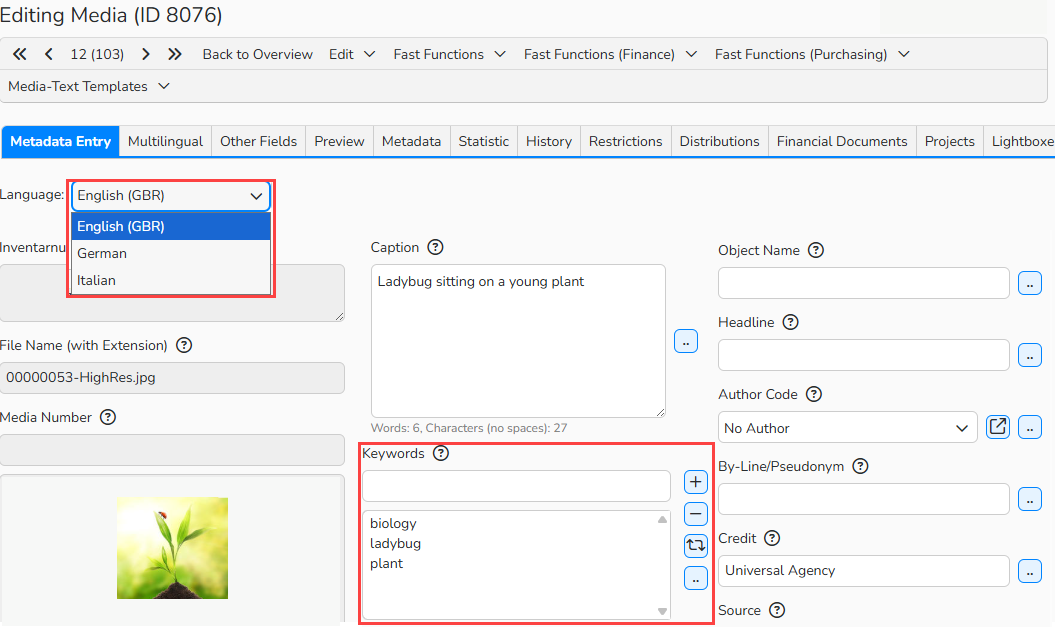
Editing Media: Select a language from the dropdown menu, keywords in the selected language
How the Multilingual Index Interprets Search Phrases
- The system translates a German search query into English and Italian using built-in dictionaries. It then searches the English and Italian indexes with these translations. For example, if the search term is Hund, the indexes receive: Hund (German), Cane (Italian), and Dog (English).
- The system also looks for synonyms (Media Management > Classifications > Dictionaries) for the original German term and its translations. If synonyms exist, it adds them to the query. For example, the indexes receive:
- German: Hund, Rüde, Vierbeiner
- Italian: Cane, Cucciolo, Cagnolino
- English: Dog, Hound, Doggy
- Each index also searches for the original term, regardless of language. So the Italian and English indexes additionally process Hund and return any matching results.
- Some terms, such as proper names without alternate meanings (e.g., Elton John), have no translations or synonyms. In these cases, the system still sends the original phrase to all indexes. For ambiguous names like Tom Cruise, translations may include meanings like “Kreuzfahrt” (cruise).
Note
Searching in a Different Language
When an image editor searches in a language other than their assigned one, the system cannot translate the term because no translation exists. The original term is still sent to all three indexes.
Media Download
When downloading a media file, the system writes the search language selected by the editor into the media’s metadata. If no language is selected, it uses the fallback languages you defined (see next chapter). Fallbacks apply both to downloads from your webshop and from the my-picturemaxx media network.
Additional search language settings
In Backstage you can define the default language for your metadata and set additional fallback languages. Fallbacks apply when the preferred language is missing and the system needs to use another index language.
To configure default language and fallbacks:
- Navigate to Administration > Language Settings > Languages.
- Click Configure Fallbacks to set additional fallback languages for each source language. These fallbacks are used when the preferred language is unavailable.
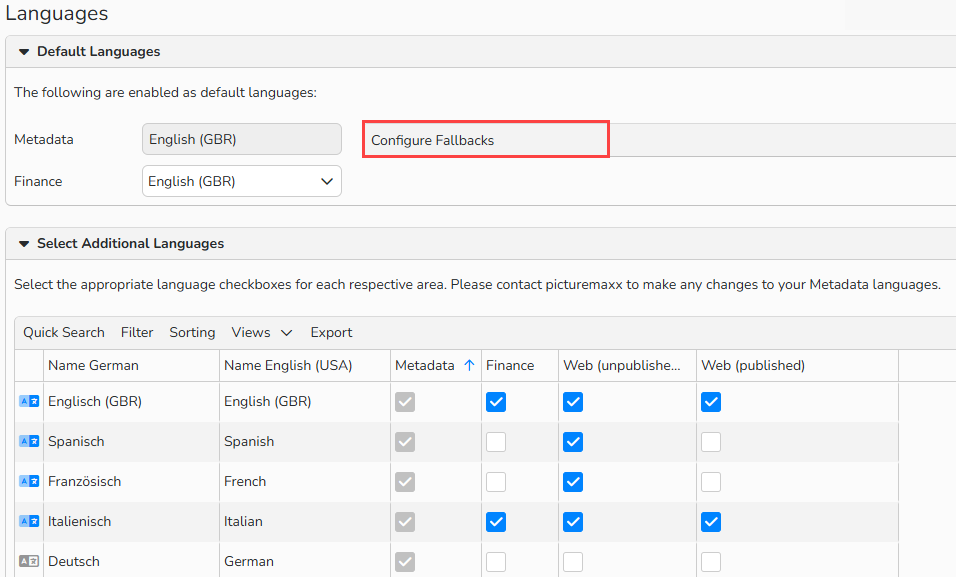
Language Settings: Configure fallbacks
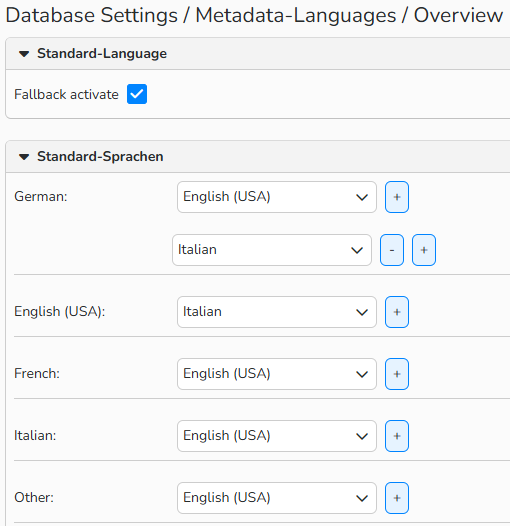 Language Settings > Configure fallbacks: set additional fallback languages for each source language
Note
Need Help?
The topic of search indexes is complex. If you have questions about setting up Multilingual Index or need support using your existing keywords, please email our support team at support@picturemaxx.com.