
my-picturemaxx : Classification Matrix Filter (ENG)
Download as PDFOverview
The matrix filter in my-picturemaxx offers advanced filtering options that go beyond standard search filters. It helps your customers quickly find the right image even within large media inventories.
This filter enables more precise searches based on descriptive content, such as the number of people in an image or a person’s ethnicity. It works across multiple providers; however, only results from Channels that support the selected filter will be displayed.
picturemaxx provides an initial set of matrix filters based on the most frequently used criteria. You can extend and customize these filters to meet your needs and make them available via my-picturemaxx.
View and configure matrix filters
In addition to the 'my-picturemaxx search filters', you can set individual matrix filters for each channel under Media > Classifications > my-picturemaxx Matrix-Filter.
Here you can get an overview of the subject areas picturemaxx offers for matrix filtering and see whether the expected image material is Creative or Editorial.
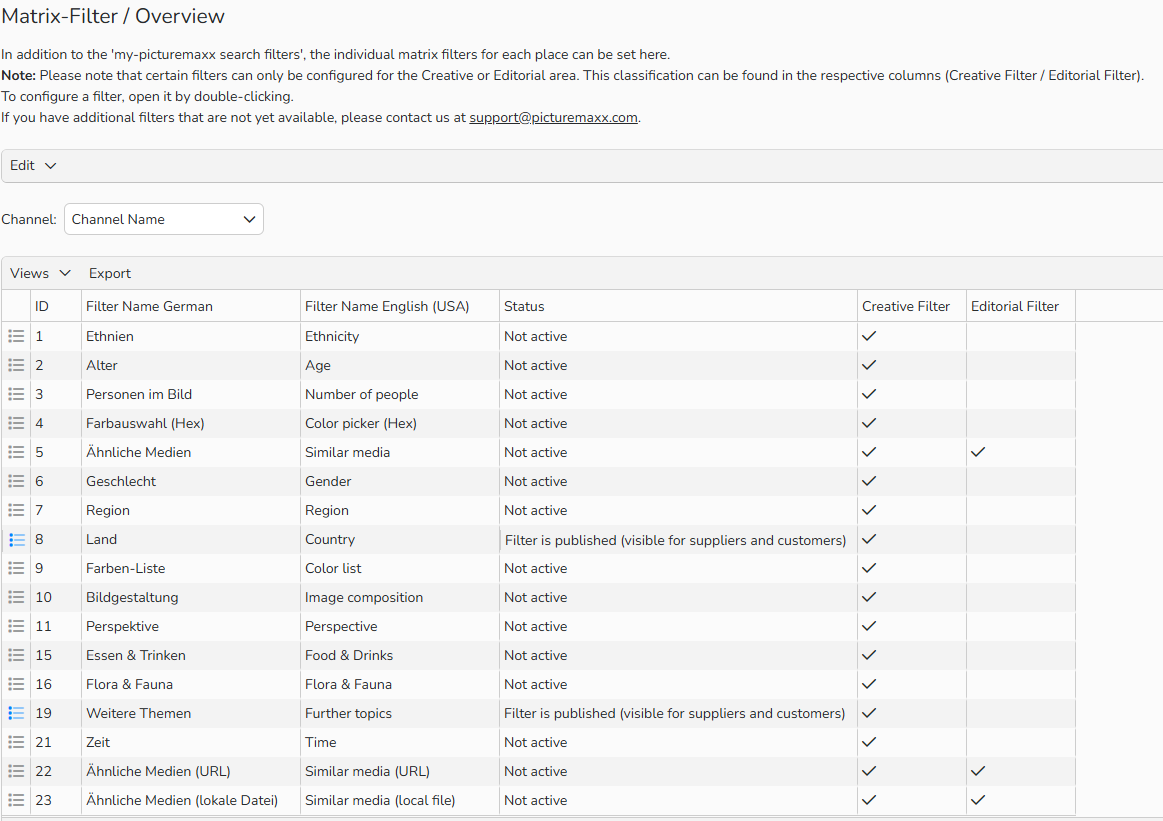
Overview of available matrix filters
Remarque
If you have additional filters that are not yet available, please contact us at support@picturemaxx.com.
To configure a matrix filter:
- Navigate to Media > Classifications > my-picturemaxx Matrix-Filter and double-click a record in the overview to open it.
- If you manage multiple Channels, select the correct Channel.
- From the Status dropdown, select one of the following options:
- To enable the filter, select Filter is published (visible for suppliers and customers).
- To test the filter first, select Filter is in preview mode (visible only for suppliers).
- Click Save.
- In the Archive and Partner Connections panel, to map the filter to your data, proceed as follows:
- From the Database field dropdown, select the database field that contains the relevant information for this filter.
- In the Values to be mapped (comma-separated) column, enter the terms or abbreviations that should match when clients use this filter.
- For phrases, use quotes or underscores:
"african american"orafrican_american. - Only use phrases if they are stored with your images.
- For phrases, use quotes or underscores:
- Wildcards are not allowed for quality reasons.
- Leave fields empty for filters you don’t support.
- Click Save.
Remarque
If you have more than one archive or additional partner connections, contact us at support@picturemaxx.com for setup assistance.
Test Matrix Filter results for your channel
With my-picturemaxx AGENCY, you can see how the matrix filter works and how your customers see your channel in general. Here is how to test it:
- Launch your my-picturemaxx AGENCY version.
- In the top-left corner, select Creative instead of All.
- Your configured matrix filters will now appear alongside the standard filters.
- Select one or more matrix filters.
- Run a test search with the filters activated.
Matrix filters are visible to all users if:
- The channel is accessible to the client.
- The channel supports the selected filter.
To test your images now or in the future, you’ll need the latest version of my-picturemaxx AGENCY. To check your version:
- In my-picturemaxx, go to Help > Check for update to see your current version.
- Update if needed.
- Alternatively, download the latest version from our website: https://www.picturemaxx.com/en/my-picturemaxx?LCID=2
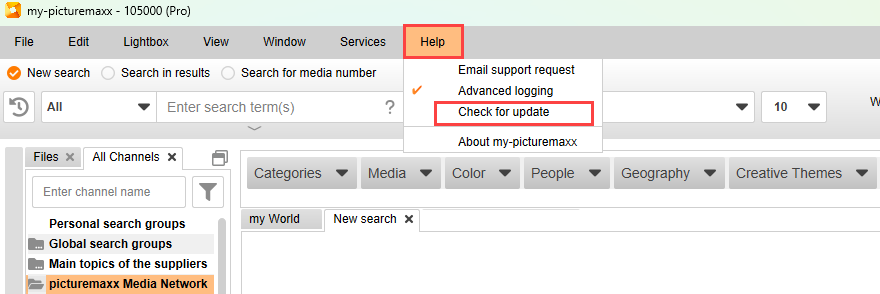
my-picturemaxx: Check for update
Remarque
Need More Licenses?
If your team needs additional my-picturemaxx AGENCY licenses, please contact us.
Mapping Examples for the Matrix Filter
The following table shows sample mappings for each filter category.
- You can use these examples as a guide, but you’re free to apply your own criteria.
- The examples provided do not need to be copied exactly.
- Make sure the words in the column match the language you use for your keywords.
ID 1 – Ethnicity / Ethnien
| Filter value English (USA) | Filter value German | Values to be mapped (separated by comma) |
|---|---|---|
| African | Afrikanisch | african, afrikanisch, Afrikaner, Afrikanerin |
| African American | Afroamerikanisch | afro_american, ''afro american'' afroamerikanisch, afro-amerikanisch |
| Brazilian | Brasilianisch | brazilian, brasilianisch, Brasilianerin, Brasilianer |
| Caucasian | Weiß | caucasian, ''caucasian ethnicity'', ''kaukasische Ethnie'', hellhäutig |
| Chinese | Chinesisch | chinese, chinesisch, Chinese, Chinesin |
| East Asian | Ostasiatisch | east_asian, ''east asian'', ostasiatisch |
| Japanese | Japanisch | japanese, japanisch, Japaner, Japanerin |
| Latin American and Hispanic | Hispanoamerikanisch | hispanic, hispanoamerikanisch, lateinamerikanisch |
| Middle Eastern | Naher Osten | middle_eastern, ''middle eastern'', ''Naher Osten'' |
| Multi-Ethnic | Multiethnisch | multi-ethnic, ''multi ethnic'', multhiethnisch |
| Native American | Amerikanische Ureinwohner | native_american, Indigene, ''Amerikanische Ureinwohner'' |
| Pacific Islander | Pazifischer Inselbewohner | pacific_islander, ''pacific islander'', ''Pazifischer Inselbewohner'' |
| Southeast Asian | Südostasiatisch | southeast_asian, ''southeast asian'' |
| Black | Schwarz | black, schwarz, dunkelhäutig |
| South Asian | Südasiatisch | south_asian, ''south asian'' |
| Indian | Indisch | indian, indisch, Inder, Inderin |
| Other | Andere | other, andere |
ID 2 – Age / Alter
Age information can be provided in different ways (see table). Preferably, use a consistent format that also appears in your keywords, titles, etc. For example, you can use the word “old” for the column Older Adult (Senior) / Senior Adult.
| Filter value English (USA) | Filter value German | Values to be mapped (separated by comma) |
|---|---|---|
| Baby | Baby | baby, newborn, 0-1_months, Neugeborenes, Säugling |
| Infant | Kleinkind | infants, 2-3_years, ''2-3 years'', toddler, Kleinkind |
| Child | Kind | child, children, Kind, Kinder |
| Teenager | Jugendlicher | teenager, teenagers, teen, Jugendlicher, ''16 Jahre'' |
| Adult | Erwachsener | adult, Erwachsener |
| Senior | Senior | senior, old, alt, Senior, Seniorin |
| Young adult | Frühes Erwachsenenalter | young_adult, junger_Erwachsener |
| Mid adult | Mittleres Erwachsenenalter | mid_adult, mittlerer_erwachsener |
| Mature adult | Reifes Erwachsenenalter | mature_adult, reifer_erwachsener |
| 0-1 | 0-1 | 0-1 |
| 20s | 20er | 20s, 20er |
ID 3 – Visible Persons / Personen im Bild
| Filter value English (USA) | Filter value German | Values to be mapped (separated by comma) |
|---|---|---|
| Without people | Ohne Menschen | 0, peopleless, nobody, ''without people'', ''keine Menschen'', ''ohne Menschen'', niemand |
| One person | Eine Person | 1, one,''one Person'', ''eine Person'', ''1 Person'' |
| Two people | Zwei Personen | 2, two, ''two people'', ''two persons'' |
| Three people | Drei Personen | 3, three, ''3 people'' |
| Four people | Vier Personen | 4, four, ''four persons'' |
| Couple | Paar | couple, Paar, Pärchen |
| Family | Familie | family, Familie |
| Group of people | Personengruppe | ''group of people'', group_of_people |
| Mass of people | Menschenmasse | crowd, ''mass of people'' |
ID 4 – Color Picker (Hex) / Farbauswahl (Hex)
For further information, please contact our Professional Services team
ID 5 – Similar Media / Ähnliche Medien
For further information, please contact our Professional Services team
ID 6 – Gender / Geschlecht
| Filter value English (USA) | Filter value German | Values to be mapped (separated by comma) |
|---|---|---|
| Male | Männlich | male, males, man, men, männlich, männliche, Mann, Männer, Jungen |
| Female | Weiblich | female, females, woman, women, weiblich, weibliche, Frau, Mädchen |
| Mixed | Gemischt | both, ''male and female'', ''männlich und weiblich'', gemischt |
| Diverse | Divers | diverse, divers, ''drittes Geschlecht'' |
ID 7 – Region / Region
| Definition and Examples of Selected Filter OptionsFilter value English (USA) | Filter value German | Values to be mapped (separated by comma) |
|---|---|---|
| Africa | Afrika | africa, Afrika |
| Antarctic | Antarktis | antarctica, Antarktis |
| Arctic | Arktis | arctic, Arktis |
| Asia | Asien | asia, Asien |
| Australia | Australien | australia, Australien |
| Europe | Europa | europe, Europa |
| America | Amerika | america, Amerika |
| North America | Nordamerika | north_america, ''north america'' Nordamerika |
| South America | Südamerika | south_america, Südamerika |
| Oceania | Ozeanien | oceania, Ozeanien |
ID 9 – Color list / Farben-Liste
| Filter value English (USA) | Filter value German | Values to be mapped (separated by comma) |
|---|---|---|
| Black | Schwarz | black1, black2, #000000, schwarz |
| White | Weiß | white1, white2, #FFFFFF |
| Yellow | Gelb | yellow1, yellow2, yellow3 |
| Orange | Orange | orange1, orange2, orange3 |
| Red | Rot | red1, red2, red3 |
| Lime green | Hellgrün | lime_green1, ''lime green 1'' |
| Dark green | Dunkelgrün | dark_green1, ''dark green1'' |
ID 11 – Perspective / Perspektive
| Filter value English (USA) | Filter value German | Values to be mapped (separated by comma) |
|---|---|---|
| Worm's-eye view | Froschperspektive | ''worm’s-eye view'', Froschperspektive |
| Aerials | Luftaufnahme | aerials, Luftaufnahme |
| Top view | Draufsicht | top_view, ''top view'', Draufsicht |
| Wide angle | Weitwinkel | wide_angle, ''wide angle'', Weitwinkel |
| 360° / Panoramas | 360° / Panorma | 360, panoramas |
| Close-up | Nahaufnahme | close_up, ''close up'', Nahaufnahme |
| Macro | Makro | macro, Makro |
| Outdoor shot | Außenaufnahme | outdoor_shot, Außenaufnahme |
| Indoor shot | Innenaufnahme | indoor_shot, Innenaufnahme |
Definition and examples of selected filter options
Select and keyword each filter based on the definitions below to maximize reach and effectiveness.
my-picturemaxx customers know exactly what they want. They use Matrix Filters to find images that match their vision.
Activate and configure filters to make your images easy to find. A well-managed Matrix Filter for your Creative Images helps you stand out, ensures quick and efficient searches, and keeps customers coming back.
ID 1 – Ethnicity / Ethnien
Ethnicity refers to a group of people who share a common culture, often linked to a tribe or nation.
For example:
Two women are on holiday in Milan. They are of Japanese origin, so they should be tagged with the filter Ethnicities > Japanese.
Additional filter options are available for countries and regions.

Young Japanese women in Milan
ID 2 – Age / Alter
You can store the age of people in the image. Each filter option corresponds to a specific age range. Examples include baby, toddler, child, teenager, adult, and senior. You can also select an age span in 10-year steps starting from age 20.
ID 3 – Visible Persons / Personen im Bild
This filter lets you specify the number of people in an image.
- Choose 1 person, 2 people, 3 people, or 4 people.
- You can also select Couple or Family.
- For more than 5 people, use Group of people.
- If the crowd is too large to count, select Crowd of people (see examples).
- If there are no people in the image, use Without people.

Group of People (reasonable number)
ID 6 – Gender / Geschlecht
The genders Female, Male and Divers are covered with the filter category Gender. Additionally, the filter option Mixed is available.

Mixed
ID 9 – Color list / Farben-Liste
Select the colors that dominate the overall image. Avoid tagging every visible color—the filter is designed to highlight a consistent color composition within the chosen spectrum.
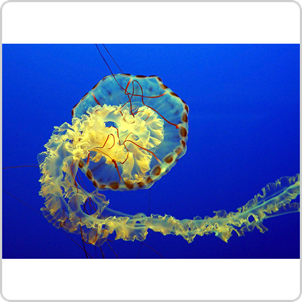
Dark Blue and Yellow
ID 11 – Perspective / Perspektive
The frog perspective refers to viewing a subject from a very low angle.
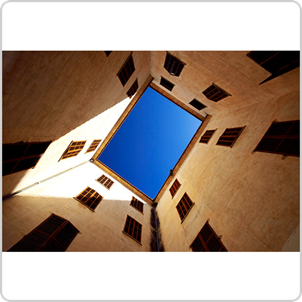
Frog perspective
An aerial view is a photograph of the Earth’s surface taken from an aircraft
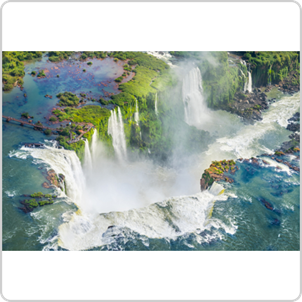
Aerial view
In a top-down view, the object is seen directly from above, with the viewer’s line of sight at a 90° angle, unlike a bird’s-eye or aerial view.

Top-down view
Wide-angle images capture a broader field of view than the human eye and use a focal length shorter than the standard range.
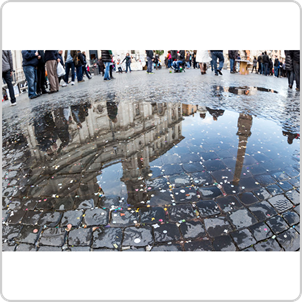
Wide angle view
In a close-up, the distance between the subject and the object is shortened to bring out the details.
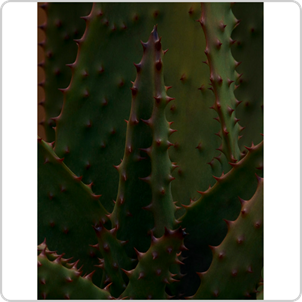
Close-up view
FAQs
Why do Matrix Filter categories change?
Matrix Filters only display values that currently return search results. They adapt dynamically based on each search, the selected setting (All, Creative, Editorial), and the channels included.
What if my image library supports filter options not shown in the Matrix Filter?
If you can classify your media by topics not yet offered in the Matrix Filter, let us know. We continuously update the filter with useful categories.
My agency doesn’t support the Matrix Filter yet. Will my images still appear?
Yes. Searches under All and Editorial return results without Matrix Filters.
When Creative is selected, filters apply only if one of the chosen agencies supports them. Filters activate only when users select them (e.g., People > Two People). Categories unsupported by any selected agency are hidden.
Do media buyers have to use the Matrix Filter?
No. The Matrix Filter is optional and not enabled by default. It simply offers additional search options.
What if Matrix Filter results are inaccurate due to poor metadata?
We can help you set up and optimize your Matrix Filter. Contact our support team for assistance.