
Custom Tokens
Overview
Custom tokens allow you to store information that can be reused throughout your picturemaxx Drupal CMS. This is useful when the same content needs to appear in multiple places.
Use custom tokens to:
- Tailor a confirmation message after a customer successfully submits a contact form.
- Define sender and recipient email addresses for form notifications.
- Store legal information.
- Display an instance name in SEO meta tags or on the browser tab next to the favicon.
Create and manage custom tokens
- In the main administration menu, go to Structure > Custom Tokens.
- Review the list of existing custom tokens.
- To modify an existing token, click Edit next to the token you want to update.
- Make the required changes and save them.
- To create a new custom token, click + Add Token.
- Enter the token details and save the new token. See Field Reference below for details.
Custom Tokens example
Our Demo site includes several pre-configured tokens:
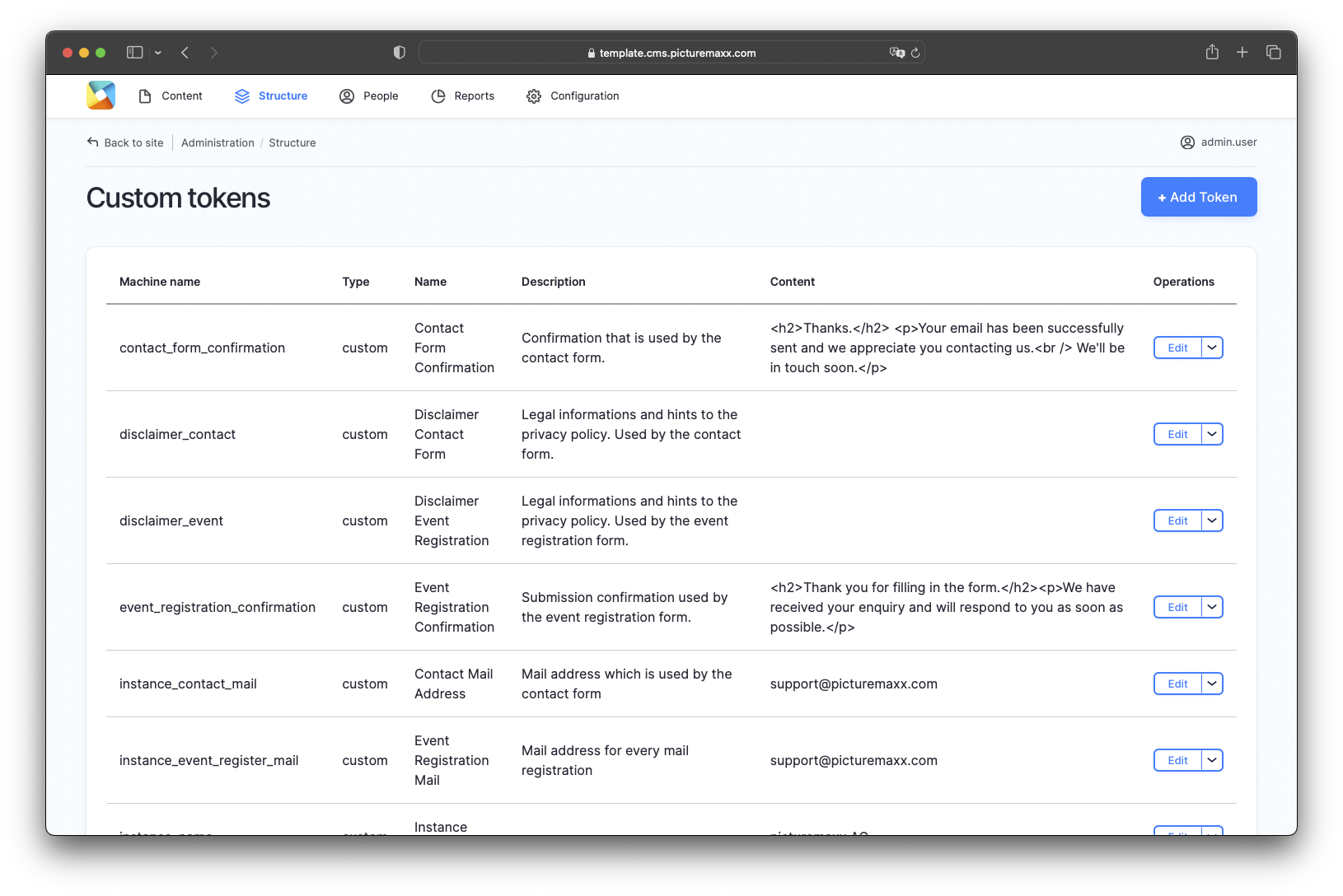
Field Reference
Token type
Select Custom to create a custom token.
Name
Enter a descriptive name for the token. This name is used for administrative purposes and helps identify the token in the overview.
- The Machine Name is generated automatically as you enter the Name field. Once the token is created, the Machine Name cannot be changed, even if you later rename the token.
Description
Provide a brief description of the token's purpose. This information is displayed in the token overview and helps administrators understand its function.
Content
Enter the information you want to display when the token is used. For example, enter a text message, email address, or instance name.